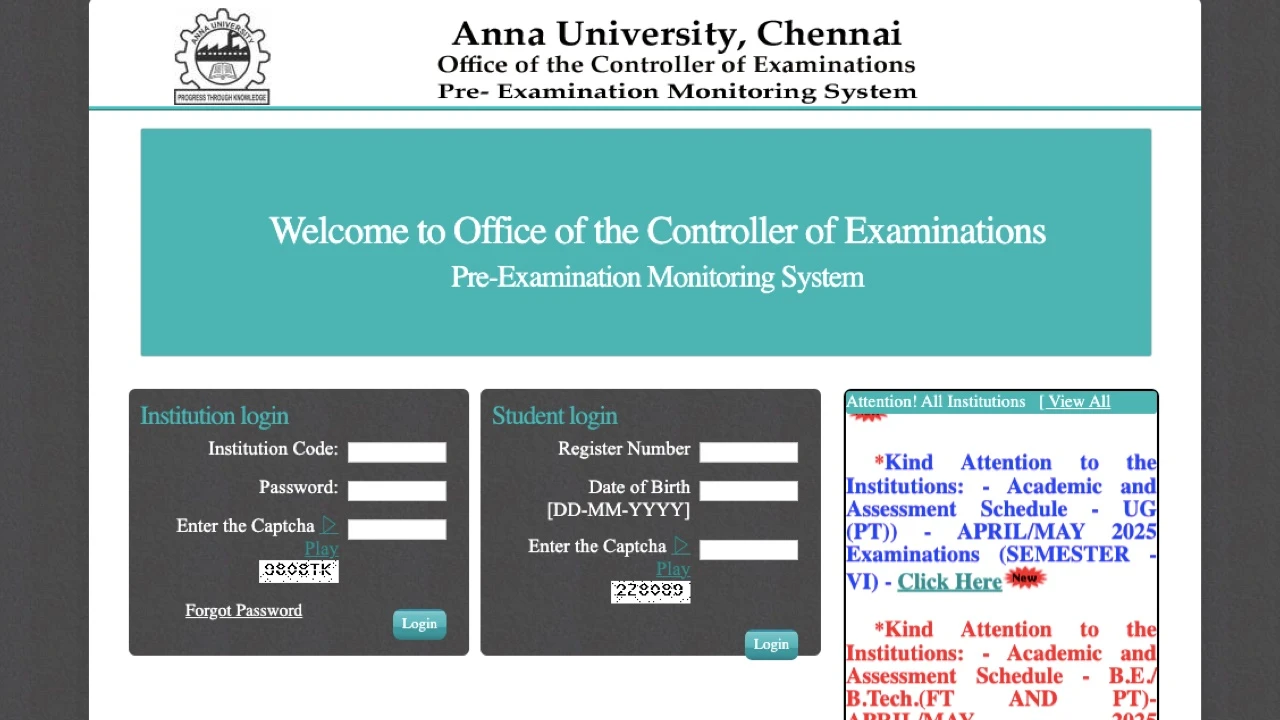
Anna University Result April/May 2026 அனைத்து UG மற்றும் PG students-க்கும் publish ஆகியுள்ளது. coe1.annauniv.edu அல்லது coe.annauniv.edu-ல் உங்கள் 12-digit register number மற்றும் date of birth உள்ளிட்டு உடனே result check செய்யலாம். B.E, B.Tech, M.E, M.Tech, MBA, MCA மற்றும் PhD programmes அனைத்திற்கும் Anna University COE portal-ல் ஒரே இடத்தில் result கிடைக்கும்.
Photocopy-க்கு apply செய்ய கடைசி தேதி: 18 August 2026, மாலை 5:00 PM. இந்த deadline தவறினால் revaluation-க்கு apply செய்யவே முடியாது. உடனே portal-ல் check செய்யுங்கள்.
Anna University Result: Latest Status மற்றும் Official Portals
Anna University semester result Controller of Examinations (COE) portal-ல் publish ஆகும். Office of the Controller of Examinations, Chennai இதை நிர்வகிக்கிறது. ஒவ்வொரு ஆண்டும் 2 முறை exam நடக்கும்: November/December (Odd Semester) மற்றும் April/May (Even Semester). Tamil Nadu-ல் உள்ள அனைத்து affiliated colleges-ன் result ஒரே centralised portal-ல் வரும்.
| Exam Session | Result Portal | Login Credential | Status |
|---|---|---|---|
| April/May 2026 (Even Semester) | coe1.annauniv.edu | Register Number + Date of Birth + Captcha | Published |
| Nov/Dec 2025 (Odd Semester) | coe1.annauniv.edu | Register Number + Date of Birth + Captcha | Published (13 March 2026) |
| Revaluation Results | coe.annauniv.edu அல்லது coe1.annauniv.edu | Register Number + Captcha | Portal-ல் check செய்யுங்கள் |
| Distance Education Results | cde.annauniv.edu | Register Number + Date of Birth | Study Centre-ல் confirm செய்யுங்கள் |
| Internal மற்றும் Assessment Marks | coe1.annauniv.edu (Student Login) | Register Number + Date of Birth | Semester-wise available |
Result publish ஆன உடனே heavy server traffic ஆகும். coe1.annauniv.edu slow ஆனால் coe.annauniv.edu alternate portal try செய்யுங்கள். STUCOR mobile app peak traffic-ல் direct result access link தருகிறது.
Anna University Result Check செய்வது எப்படி: coe1.annauniv.edu
coe1.annauniv.edu திறந்து 12-digit register number மற்றும் date of birth உள்ளிட்டு Get Result click செய்தால் Anna University semester marksheet உடனே கிடைக்கும். Result ஒரு PDF scorecard-ஆக வரும், subject-wise grades மற்றும் pass/fail status அதில் இருக்கும்.
Anna University UG அல்லது PG result access செய்ய இந்த 6 steps follow செய்யுங்கள்:
- Browser திறந்து coe1.annauniv.edu அல்லது coe.annauniv.edu visit செய்யுங்கள்
- Homepage-ல் “Results” tab-ல் click செய்யுங்கள்
- Programme type select செய்யுங்கள்: UG, PG, அல்லது PhD
- Login form-ல் 12-digit register number மற்றும் date of birth (DD-MM-YYYY format) உள்ளிடுங்கள்
- Screen-ல் காட்டப்படும் captcha code சரியாக type செய்யுங்கள்
- “Get Result” அல்லது “Submit” click செய்யுங்கள். Marksheet PDF திரையில் வரும், download செய்யுங்கள்
PDF-ஐ உடனே clear file name கொடுத்து save செய்யுங்கள். இந்த provisional marksheet revaluation application, college submission மற்றும் placement documentation-க்கு பலமுறை தேவைப்படும்.
Anna University Result Scorecard-ல் என்ன Information இருக்கும்
Anna University semester marksheet-ல் subject codes, letter grades, grade points, credits, GPA மற்றும் ஒவ்வொரு course-ன் result status இருக்கும். Official purpose-க்கு பயன்படுத்துவதற்கு முன்பு scorecard-ல் உள்ள அனைத்து details-ஐயும் verify செய்யுங்கள்.
- Student name, register number மற்றும் regulation year
- Programme name: B.E, B.Tech, M.Tech, MBA, அல்லது MCA
- Subject code, subject name மற்றும் ஒவ்வொரு course-க்கான credits
- ஒவ்வொரு subject-க்கும் letter grade மற்றும் grade points
- Semester GPA (SGPA) மற்றும் updated Cumulative GPA (CGPA)
- ஒவ்வொரு subject-ன் result status: Pass (P), Re-Appear (RA), Absent (AB), அல்லது Withheld (W)
Name, register number அல்லது marks-ல் ஏதாவது error இருந்தால் உடனே college examination cell-ல் report செய்யுங்கள். Original marksheet மற்றும் Consolidated Statement of Grades பிறகு respective colleges மூலம் கொடுக்கப்படும்.
Anna University Grading System மற்றும் Passing Marks
Anna University 10-point absolute grading system follow செய்கிறது. Theory மற்றும் practical exams-ல் தனித்தனியாக 50% score செய்தால் pass ஆகலாம். O முதல் C வரை letter grades pass performance-ஐ காட்டுகின்றன. RA (Re-Appear) என்றால் student அந்த subject-ல் fail ஆனார்.
| Marks (100-ல்) | Letter Grade | Grade Point | Status |
|---|---|---|---|
| 91 முதல் 100 | O (Outstanding) | 10 | Pass |
| 81 முதல் 90 | A+ (Excellent) | 9 | Pass |
| 71 முதல் 80 | A (Very Good) | 8 | Pass |
| 61 முதல் 70 | B+ (Good) | 7 | Pass |
| 51 முதல் 60 | B (Average) | 6 | Pass |
| 41 முதல் 50 | C (Satisfactory) | 5 | Pass (Regulation 2021 மற்றும் அதற்கு மேல்) |
| 40-க்கும் கீழே | RA (Re-Appear) | 0 | Fail: Arrear exam எழுத வேண்டும் |
C grade Regulation 2021 மற்றும் அதற்கு மேல் உள்ள students-க்கு மட்டும் பொருந்தும். Regulation 2017 மற்றும் பழைய regulations-ல் 41 முதல் 50 marks range-க்கு RA கொடுக்கப்பட்டது. உங்கள் regulation year hall ticket-ல் confirm செய்யுங்கள்.
GPA மற்றும் CGPA கணக்கிடுவது எப்படி
ஒவ்வொரு subject-ன் grade points-ஐ credits-ஆல் பெருக்கி, அனைத்தையும் கூட்டி, அந்த semester-ன் total credits-ஆல் வகுத்தால் GPA கிடைக்கும். Anna University அனைத்து regulations-லும் credit-weighted average system use செய்கிறது.
- GPA Formula: GPA = Σ(Credits x Grade Points) / Total Credits in the semester
- CGPA Formula: CGPA = Σ(Credits x Grade Points across all semesters) / Total Credits completed
- Percentage Conversion: CGPA x 10 = Percentage (உதாரணம்: CGPA 8.3 = 83%)
இந்த percentage conversion formula Regulation 2017, 2021 மற்றும் 2023 மூன்றிற்கும் same ஆக இருக்கும்.
Anna University Degree Classification: CGPA அடிப்படையில்
- First Class with Distinction: 8.50 அல்லது அதிகமான CGPA, எந்த semester-லும் first appearance-ல் arrear இல்லாமல், programme standard duration-ல் complete செய்திருக்க வேண்டும்
- First Class: 6.50 அல்லது அதிகமான CGPA
- Second Class: 6.00 முதல் 6.49 CGPA
ஒரே ஒரு arrear கூட clear செய்திருந்தாலும் First Class with Distinction கிடைக்காது, CGPA 8.50-க்கு மேல் இருந்தாலும் சரி. இந்த rule Regulation 2021 மற்றும் R2017-ல் பொருந்தும். Exam-க்கு முன்பு withdrawal செய்தது arrear-ஆக count ஆகாது.
Anna University Result: Courses மற்றும் Regulations
Anna University Regulations 2014, 2017, 2021, 2023 மற்றும் 2025-ல் உள்ள அனைத்து UG, PG மற்றும் PhD students-க்கும் ஒரே நேரத்தில் ஒரே COE portal-ல் result publish ஆகும். அனைத்து regulation batches-க்கும் same login process.
UG Courses
- B.E (Bachelor of Engineering): CSE, ECE, EEE, Civil, Mechanical அனைத்து branches
- B.Tech (Bachelor of Technology) programmes
- B.Arch (Bachelor of Architecture)
- B.Voc (Bachelor of Vocation)
- B.E EEE Training Integrated
PG Courses
- M.E மற்றும் M.Tech: engineering specialisations
- MBA (Master of Business Administration) மற்றும் MBA Integrated
- MCA (Master of Computer Applications)
- M.Arch (Master of Architecture)
- M.Sc: applied sciences programmes
Anna University Result Status Codes: RA, W, AB, SA என்றால் என்ன
அண்ணா பல்கலைக்கழகம் grade sheet-ல் உள்ள இந்த 5 status codes-ஐ தெரிந்துகொள்வது admission மற்றும் job applications-ல் confusion தவிர்க்க உதவும்.
| Code | Full Form | அர்த்தம் | என்ன செய்வது |
|---|---|---|---|
| RA | Re-Appear | Student அந்த subject-ல் fail ஆனார். 0 grade points. CGPA-வில் count ஆகாது. | Supplementary அல்லது arrear examination-ல் appear ஆகுங்கள் |
| W | Withheld | Document அல்லது attendance issue-ஆல் result hold ஆகியுள்ளது | உடனே college examination cell-ல் contact செய்யுங்கள் |
| AB | Absent | Student அந்த exam எழுதவில்லை | Arrear examination-ல் appear ஆகுங்கள் |
| SA | Short Attendance | Attendance குறைவால் exam எழுத தகுதி இல்லை | College-ல் attendance record confirm செய்யுங்கள் |
| P | Pass | பழைய grade sheets-ல் மட்டும் காணப்படும் | தற்போது O, A+, A, B+, B, C grades show ஆகும் |
Anna University Revaluation Result: Apply செய்வது எப்படி
Anna University semester result-ல் திருப்தி இல்லாத students COE portal-ல் notified deadline-க்குள் revaluation-க்கு apply செய்யலாம். ஒவ்வொரு subject-க்கும் fee Rs. 400.
Result பார்த்த பிறகு 3 post-result options உள்ளன:
- Photocopy Request: உங்கள் answer script-ன் scanned copy கிடைக்கும். coe1.annauniv.edu-ல் காட்டப்படும் photocopy deadline-க்குள் apply செய்யுங்கள். Revaluation genuinely தேவையா என்று இதை பார்த்து decide செய்யுங்கள். April/May 2026-க்கு deadline 18 August 2026, மாலை 5 PM.
- Revaluation: Senior examiner உங்கள் answer script மீண்டும் evaluate செய்வார். Marks கூடலாம், குறையலாம், அல்லது same ஆக இருக்கலாம். Photocopy பார்த்த பிறகே apply செய்யுங்கள். Result பொதுவாக 20 முதல் 30 days-க்குள் வரும்.
- Review of Answer Scripts: Revaluation-க்கு பிறகு higher-level review. COE portal-ல் revaluation results publish ஆன பிறகு Review window தனியாக open ஆகும்.
Revaluation-க்கு Apply செய்யும் Steps
- coe1.annauniv.edu அல்லது coe.annauniv.edu visit செய்யுங்கள்
- Register number மற்றும் date of birth பயன்படுத்தி login செய்யுங்கள்
- “Apply for Photocopy or Revaluation” section-க்கு செல்லுங்கள்
- Re-evaluate செய்ய விரும்பும் subject அல்லது subjects select செய்யுங்கள்
- College examination cell மூலம் online-ல் revaluation fee pay செய்யுங்கள்
- Revaluation application confirmation download செய்து records-ல் வையுங்கள்
Anna University Result பார்த்த பிறகு என்ன செய்வது: 4 Actions
Marks download செய்வது step one மட்டுமே. Anna University semester result வந்த உடனே இந்த 4 priorities act செய்யுங்கள்.
- Photocopy-க்கு முதலில் apply செய்யுங்கள்: ஏதாவது subject grade எதிர்பாராத விதமாக குறைவாக இருந்தால் photocopy-க்கு உடனே apply செய்யுங்கள். April/May 2026 exams-க்கு deadline coe1.annauniv.edu-ல் 18 August 2026, மாலை 5 PM.
- Revaluation-க்கு apply செய்யுங்கள்: Photocopy-ல் evaluation error கண்டறிந்தால் coe.annauniv.edu-ல் stated deadline-க்குள் apply செய்யுங்கள்.
- Arrear clearance-க்கு register செய்யுங்கள்: RA grade வந்தால் supplementary examination-க்கு college மூலம் apply செய்யுங்கள். Early ஆக arrear clear செய்தால் Distinction eligibility பாதிக்காது.
- Provisional marksheet save செய்யுங்கள்: coe1.annauniv.edu-லிருந்து PDF download செய்யுங்கள். College placement cell, higher education applications-க்கு இது தேவைப்படும். Original Consolidated Statement of Grades பிறகு respective colleges மூலம் கிடைக்கும்.
Anna University Distance Education Result
அண்ணா பல்கலைக்கழகம் Distance Education results August/September மற்றும் February/March exam sessions-க்கு cde.annauniv.edu portal-ல் தனியாக publish ஆகும். Hall ticket அல்லது distance education result access-ல் problem இருந்தால் students respective Study Centre-ஐ approach செய்ய வேண்டும்.
Distance education students Centre for Distance Education, Anna University, Chennai-ல் revaluation applications மற்றும் mark verification-க்கு contact செய்யலாம்.
Anna University Result-ல் பொதுவான Problems மற்றும் Solutions
| Problem | காரணம் | Solution |
|---|---|---|
| Website திறக்கவில்லை | Result publish ஆன உடனே heavy traffic | coe.annauniv.edu try செய்யுங்கள் அல்லது STUCOR app use செய்யுங்கள். Early morning அல்லது late night try செய்யுங்கள். |
| Invalid register number error | Wrong number entered | Hall ticket-ல் உள்ள 12-digit number சரியாக confirm செய்யுங்கள் |
| Date of birth mismatch | Format தவறு | DD-MM-YYYY format-ல் மட்டும் enter செய்யுங்கள் |
| Result not found | அந்த semester result இன்னும் publish ஆகவில்லை | Official portal-ல் notification check செய்யுங்கள் |
| Marksheet-ல் name அல்லது marks error | University record-ல் mistake | College examination cell-ல் உடனே report செய்யுங்கள் |
Frequently Asked Questions: Anna University Result
Anna University Result coe1.annauniv.edu மற்றும் coe.annauniv.edu இல் available. 12-digit register number மற்றும் date of birth பயன்படுத்தி login செய்யுங்கள். Heavy traffic-ல் STUCOR app மூலமும் direct result access link கிடைக்கும்.
RA என்பது Re-Appear. Student அந்த subject-ல் fail ஆனார் என்று அர்த்தம். Arrear examination-ல் மீண்டும் appear ஆக வேண்டும். RA grade-க்கு 0 grade points கிடைக்கும், CGPA-வில் count ஆகாது. Later attempt-ல் arrear clear செய்தால் grade restore ஆகும் ஆனால் Distinction eligibility போகும்.
Theory மற்றும் practical components-ல் தனித்தனியாக குறைந்தது 50% score செய்ய வேண்டும். Regulation 2021-ல் 41 முதல் 50 marks-க்கு C grade கொடுக்கப்படும், இது pass ஆகும். பழைய regulations-ல் இந்த range-க்கு RA கொடுக்கப்பட்டது.
CGPA-ஐ 10-ஆல் பெருக்கினால் Anna University percentage கிடைக்கும். உதாரணம்: CGPA 7.8 = 78%. இந்த formula Regulation 2017, 2021 மற்றும் 2023 அனைத்திற்கும் same.
Exam முடிந்து 45 முதல் 60 days-க்குள் Anna University semester result publish ஆகும். Nov/Dec exams-க்கு February அல்லது March-ல் result வரும். April/May exams-க்கு June அல்லது July-ல் result வரும். coe1.annauniv.edu-ல் result notifications check செய்யுங்கள்.
Anna University Result: இப்போது என்ன செய்வது
Result-ல் ஏதாவது subject-ல் marks எதிர்பாராத விதமாக குறைவாக வந்தால் தாமதிக்காதீர்கள். April/May 2026 Photocopy deadline 18 August 2026, மாலை 5 PM. இந்த date-க்கு முன்பே coe1.annauniv.edu-ல் apply செய்யுங்கள்.
RA grade வந்தவர்கள் arrear exam-க்கு college மூலம் உடனே register செய்யுங்கள். Early ஆக clear செய்வது academic progress-ஐ protect செய்யும்.
Latest university results மற்றும் board exam updates-க்கு SarkariResults.post.in visit செய்யுங்கள்.