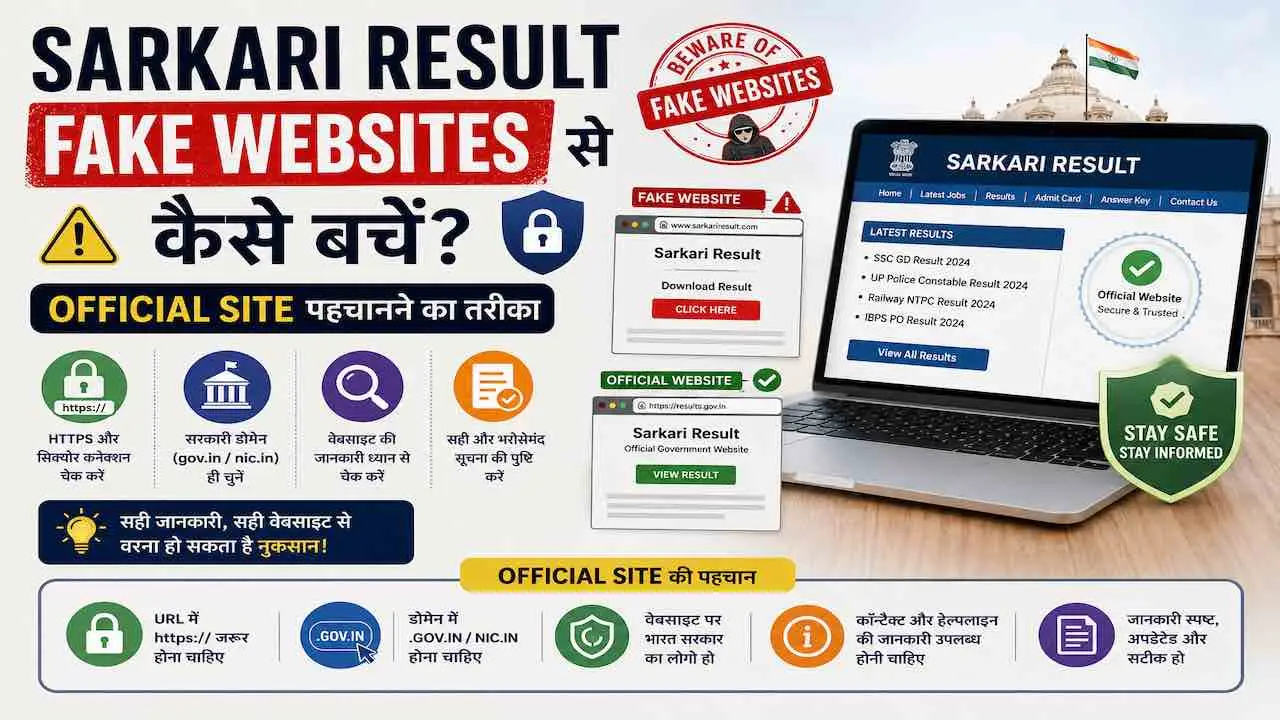
Fake Sarkari Result websites से बचने का सबसे पक्का तरीका यह है: URL में केवल .gov.in या .nic.in domain वाली sites ही official government portals हैं। जो भी site .com, .org, .in, .online, .xyz पर हो वह किसी भी सरकारी विभाग की official site नहीं है। ऐसी sites पर Aadhaar number, bank details, application fee या कोई भी personal information कभी submit न करें।
हर साल लाखों government job aspirants fake Sarkari Result websites के शिकार बनते हैं। ये sites SSC, UPSC, NTA, Railway, IBPS जैसे official portals की हूबहू copy होती हैं। ₹73,000 तक का financial fraud केवल एक गलत URL खोलने से हो सकता है। Scammers केवल पैसे नहीं चुराते, वे Aadhaar data, PAN card details और mobile number भी चुराते हैं जिससे आगे identity theft होती है। यह guide आपको बताती है कि fake site और original government website में अंतर कैसे पहचानें, किस official URL पर जाना सही है, अपना data कैसे सुरक्षित रखें और गलती हो जाए तो तुरंत क्या steps लें।
Fake Sarkari Result Website क्या होती है और यह इतनी Convincing क्यों लगती है
Fake Sarkari Result website एक digital जाल है जो किसी official government portal का design, logo, color scheme और layout हूबहू copy करके बनाई जाती है। URL अलग होता है लेकिन बाकी सब कुछ असली जैसा दिखता है।
Scammers इन sites को इसलिए बनाते हैं क्योंकि government job aspirants की संख्या करोड़ों में है और हर exam cycle में लाखों students result, admit card या application form खोजते हैं। Competition बड़ा है, anxiety high है और ऐसे में लोग URL ध्यान से नहीं पढ़ते।
Government Fake Website के 3 मुख्य मकसद
- Data theft: नाम, Aadhaar number, mobile number, email और bank account details चुराना। यह data dark web पर बेचा जाता है या directly identity fraud के लिए use होता है।
- Fee fraud: Fake registration fee, application fee, document verification fee या exam fee के नाम पर पैसे ऐंठना। UPI, Google Pay या private bank transfer माँगकर यह किया जाता है।
- Malware installation: Fake admit card, result PDF या “official” app download कराकर आपके phone या computer में malware, spyware या keylogger install करना।
Fake Sites इतनी Convincing क्यों लगती हैं
- Official site का design pixel-by-pixel copy होता है, government seals और logos identical होते हैं
- Fake sites पर भी HTTPS और green padlock होता है जो लोगों को safe लगता है
- Google और Bing पर paid ads के ज़रिए ये sites search results में सबसे ऊपर आती हैं
- Telegram groups और WhatsApp forwards पर “official result link” के नाम से share होती हैं
- Fake sites पर “result check”, “admit card download” जैसे working buttons भी होते हैं जो actually data चुराते हैं
- कुछ fake sites पहले आपको असली result दिखाती हैं, फिर अगली visit पर data माँगती हैं
Fake Sarkari Website की 11 पक्की पहचान
इन 11 संकेतों में से कोई एक भी दिखे तो तुरंत वह website बंद करें और उस पर कोई भी जानकारी submit न करें।
1. Domain Extension: सबसे पहली और सबसे पक्की जाँच
भारत सरकार की सभी official websites केवल दो domains पर होती हैं। इसके बाहर कोई भी site official नहीं है।
| Domain | मतलब | Example |
|---|---|---|
| .gov.in | केंद्र सरकार की official site, केवल government bodies ले सकती हैं | upsc.gov.in, ssc.gov.in, indiapost.gov.in |
| .nic.in | NIC (National Informatics Centre) hosted government portal | results.nic.in, cbseresults.nic.in |
| .ac.in | Authorized academic/exam authority जैसे NTA | nta.ac.in, ibps.in |
यदि URL में .com, .in, .org, .online, .xyz, .co.in, .net, .info है, तो वह website किसी भी government body की official site नहीं है। कोई exception नहीं है।
2. URL में छोटी गलती: Typosquatting Trap
Scammers original URL में केवल एक-दो characters बदलते हैं जो जल्दी में नज़र नहीं आता। इसे “typosquatting” कहते हैं।
| असली Official URL | Fake Fraudulent URL | क्या बदला गया |
|---|---|---|
| upsc.gov.in | upscgov.in | Dot हटाकर एक word बनाया |
| cbseresults.nic.in | cbseresults-nic.in | Dot को hyphen से replace किया |
| ssc.gov.in | ssc-gov.org | Extension .org कर दी |
| indiapost.gov.in | indiapostgds.online | Domain पूरी तरह बदल दी |
| nta.ac.in | nta-india.com | Dash और .com add किया |
| ssc.nic.in | sscnic.in | Dot हटाया, .in रख दी |
Rule: Browser address bar में URL का हर character ध्यान से पढ़ें। एक गलत dot, extra hyphen या बदला हुआ extension आपको fake site पर ले जाता है।
3. HTTPS और Green Padlock का धोखा
HTTPS देखकर site को safe मत समझें। यह सबसे common गलतफहमी है जिसका scammers फायदा उठाते हैं।
- HTTPS का मतलब सिर्फ यह है कि आपका data encrypted form में transfer होता है
- यह confirm नहीं करता कि site genuine है या fraudulent
- Fake websites भी free SSL certificate (जैसे Let’s Encrypt से) आसानी से ले लेती हैं
- March 2026 में Ludhiana के एक व्यक्ति ने incomtax-efiling.org पर PAN और bank details enter कीं, site पर green padlock भी था, 6 घंटे में ₹73,000 unauthorized debit हो गए
सही तरीका: Chrome में padlock → “Connection is secure” → “Certificate is valid” → “Issued to” field देखें। यहाँ exact government domain name होना चाहिए और certificate issuer NIC CA (National Informatics Centre Certificate Authority) होना चाहिए।
4. Excessive Pop-ups, Ads और Forced Redirect
कोई भी official government portal pop-up advertisement नहीं दिखाता। यदि site खुलते ही pop-ups आएं, किसी अन्य site पर redirect हो, “Congratulations! आपका result आ गया” जैसे messages दिखें, या बार-बार app download करने को कहा जाए, तो वह 100% fake site है।
5. “Guaranteed Selection” और “Leaked Paper” का झाँसा
कोई भी government body कभी guaranteed selection का वादा नहीं करती। यदि कोई website, Telegram channel, WhatsApp group या phone call यह कहे कि “पैसे दो, नौकरी पक्की” या “question paper पहले मिलेगा”, यह सीधा criminal fraud है। ऐसे किसी भी offer पर कभी trust न करें और तुरंत report करें।
6. Fee का तरीका: UPI Personal Account माँगना
Official government portals पर fee payment केवल authorized payment gateways से होती है जैसे SBI ePay, PayU Government, BillDesk या Official Challan। यदि कोई site direct UPI ID (personal), Google Pay personal number या bank account transfer माँगे, वह fraud site है।
- Official fee receipt automatically generate होती है, screenshot लें
- Fee amount official notification में लिखी amount से ज़्यादा कभी न दें
- Payment confirmation email आना चाहिए government domain से, न कि Gmail/Yahoo से
7. Contact Information गायब है या Generic Email है
असली government website पर physical address, official phone number और email होती है। Official emails हमेशा @gov.in या @nic.in पर होती हैं। Fake sites पर या तो contact details होती ही नहीं, या केवल एक Gmail, Yahoo या Hotmail ID होती है।
8. Telegram Groups और WhatsApp Forwards के Links
Telegram channels और WhatsApp forwards पर आए result links 90% मामलों में fake या phishing sites के होते हैं। “Early result link”, “Admit card before official date”, “SSC GD result direct link” जैसे labels के साथ भेजे गए links कभी directly open न करें।
- पहले official site पर जाकर verify करें कि result या admit card actually जारी हुआ है या नहीं
- Telegram channel का link भी official site से verify करें, channel name से नहीं
- WhatsApp पर government job notification PDF forward हो, उसे बिना verify किए share न करें
9. Fake Admit Card और Result PDF Downloads
Fake websites पर admit card या result PDF download करने पर malware install होता है। यह malware आपके phone का camera, microphone, contacts और banking apps तक access कर सकता है।
- Admit card हमेशा official portal login से download करें
- किसी third-party site से download किया PDF कभी open न करें
- PDF open करने से पहले antivirus scan ज़रूर करें
- Unknown source से आई APK file या app कभी install न करें
10. Search Engine Results में Top पर होना Official नहीं होता
Google या Bing पर “SSC result” search करने पर जो पहली link आए वह हमेशा official नहीं होती। Scammers Google Ads खरीदकर fake sites को paid results में top पर रखते हैं। “Ad” या “Sponsored” label वाले results पर exam portal के लिए कभी trust न करें।
11. Social Media Verification Badges की गैरमौजूदगी
Official government departments के social media accounts पर verification badge होता है। Twitter/X पर blue या gold tick, Facebook पर blue tick। इसके अलावा, official social media accounts पर सभी posts official language में होती हैं, emojis और informal language नहीं होती।
Official Sarkari Exam और Result Websites की Complete List
इन URLs को अभी bookmark करें। Result, admit card या application form हमेशा इन्हीं official portals से check करें।
| Exam / Board / Department | Official URL | Conducting Body |
|---|---|---|
| UPSC Civil Services, NDA, CDS, CAPF | upsc.gov.in | Union Public Service Commission |
| SSC CGL, CHSL, GD, MTS, CPO, JE | ssc.gov.in | Staff Selection Commission |
| CUET UG, NEET UG/PG, JEE Main, NET, CTET | nta.ac.in | National Testing Agency |
| Railway RRB Group D, NTPC, ALP, JE | indianrailways.gov.in | Ministry of Railways |
| RRB Regional Boards | rrbcdg.gov.in (rrb).gov.in pattern | Railway Recruitment Boards |
| IBPS PO, Clerk, RRB, SO | ibps.in | Institute of Banking Personnel Selection |
| SBI PO, Clerk, SO | sbi.co.in | State Bank of India |
| India Post GDS Recruitment | indiapost.gov.in | Department of Posts |
| CBSE Board 10th/12th Result | cbseresults.nic.in | CBSE via NIC |
| CBSE Official (Notifications) | cbse.gov.in | Central Board of Secondary Education |
| Board/University Results (Multiple) | results.nic.in | National Informatics Centre |
| Employment News (Sarkari Naukri) | employmentnews.gov.in | Ministry of I&B |
| EPFO, PF related | epfindia.gov.in | Employees’ Provident Fund Organisation |
| DRDO Recruitment | drdo.gov.in | Defence Research and Development Organisation |
| Income Tax e-Filing | incometax.gov.in | Income Tax Department |
State Government Job Portals का Pattern: सभी state government sites का pattern [state-abbreviation].gov.in होता है। जैसे उत्तर प्रदेश के लिए up.gov.in, राजस्थान के लिए rajasthan.gov.in, बिहार के लिए bihar.gov.in। इस pattern से बाहर कोई भी state government की official site नहीं है।
Mobile पर URL Verify करने का तरीका
भारत में 78% government job aspirants mobile से result check करते हैं। Mobile browser पर URL verify करना desktop से ज़्यादा ज़रूरी है क्योंकि mobile screen पर पूरा URL दिखता नहीं।
Android Chrome पर
- Address bar पर tap करें, पूरा URL दिखाई देगा
- URL को left-right scroll करके पूरा पढ़ें, domain extension ज़रूर check करें
- Padlock icon tap करें → “Connection is secure” → “Certificate details” देखें
- Chrome Settings → Privacy → Safe Browsing को “Enhanced Protection” पर रखें
iPhone Safari पर
- Address bar tap करें, cursor से URL के end तक जाएं
- Padlock icon tap करें → “Certificate” option select करें
- Issued to और Issued by fields confirm करें
Mobile पर अतिरिक्त सावधानी: SMS में आए government result links पर tap करने से पहले number verify करें। Government never sends result links via SMS to individuals. यदि कोई SMS “result ready, link click करें” कहे, वह phishing है।
Browser Certificate Check: Step-by-Step
यह 3-step process हर बार करें जब कोई नया government portal खोलें।
- Step 1: Address Bar में पूरा URL पढ़ें
Address bar पर click/tap करें और URL का हर character पढ़ें। Domain extension सबसे अंत में होती है जो .gov.in या .nic.in होनी चाहिए। URL के बीच में छिपे -gov या gov- patterns पकड़ें।
- Step 2: SSL Certificate Verify करें
Padlock icon पर click करें → “Connection is secure” → “Certificate is valid”। Certificate की “Issued to” field में exact domain name होनी चाहिए जो आपने open किया। “Issued by” में NIC CA या government-approved Certificate Authority होनी चाहिए।
- Step 3: Official Notification से URL Match करें
Exam की official notification PDF पर official website URL लिखा होता है। Browser में open site का URL उससे character-by-character match करें। एक भी character अलग हो तो site तुरंत बंद करें।
Fake Government Website पर जाने के बाद Immediate Action Plan
घबराएं नहीं, लेकिन अगले 30 से 60 मिनट में ये steps लें। जितनी जल्दी action लें, उतना कम नुकसान होगा।
अगर केवल Website Open की, कोई Details Submit नहीं कीं
- Website तुरंत बंद करें, उस browser tab को close करें
- Browser cache और history clear करें (Settings → Privacy → Clear Browsing Data)
- Phone या computer पर antivirus full scan चलाएं
- कोई file download हुई हो तो उसे बिना open किए delete करें
- Browser में उस site का bookmark हो तो remove करें
अगर Personal Details Submit कर दीं
- Bank को तुरंत call करें (24×7 helpline नंबर पर)। Account activity monitor करने को कहें। Suspicious transaction आए तो card तुरंत block कराएं।
- सभी important passwords तुरंत बदलें, विशेषकर email, banking apps, NTA portal, SSC portal और mobile banking का MPIN।
- Two-Factor Authentication (2FA) enable करें सभी important accounts पर।
- cybercrime.gov.in पर online complaint दर्ज करें। Complaint number note करके रखें।
- National Cyber Crime Helpline 1930 पर call करें। यह 24 घंटे available है और free है।
- CERT-In को report करें: incident@cert-in.org.in पर email से fake website का URL और details भेजें।
लेकिन Fee Transfer हो गई
- Bank को तुरंत notify करें और transaction reverse करने का request करें। Transaction के 24 घंटे के भीतर bank request सबसे effective होती है।
- UPI transaction हुई हो तो NPCI को npci.org.in पर और अपने UPI app (PhonePe, Google Pay, Paytm) के support पर भी report करें।
- Transaction screenshot, fake website screenshot और किसी भी communication का screenshot evidence के रूप में save करें।
- Local cyber cell में FIR दर्ज करें। FIR number मिलने के बाद bank refund process में यह document ज़रूरी होती है।
Golden Rule: Fake website fraud में 6 घंटे के भीतर action लेना सबसे effective है। Bank को जल्दी notify करने से fund recovery की संभावना 3 गुना बढ़ जाती है।
Fake Sarkari Result Website Report कहाँ और कैसे करें
Fake government website report करना आपकी legal और social ज़िम्मेदारी भी है ताकि बाकी aspirants उसके शिकार न बनें।
| Platform | URL / Contact | किसके लिए |
|---|---|---|
| National Cyber Crime Portal | cybercrime.gov.in | सभी प्रकार के cyber fraud की online FIR |
| National Cyber Crime Helpline | 1930 (24×7, free) | तुरंत phone पर complaint और guidance |
| CERT-In | incident@cert-in.org.in | Phishing website और malware report करना |
| Delhi Cyber Cell (National Reference) | cyber.delhipolice.gov.in | Fake government website report form |
| Google Safe Browsing Report | safebrowsing.google.com/safebrowsing/report_phish | Google Search results से fake site हटाना |
| NPCI (UPI Fraud) | npci.org.in | UPI payment fraud report करना |
Report करते समय यह Information तैयार रखें
- Fake website का पूरा URL (copy करके रखें)
- Website का screenshot जिसमें date और time दिखे
- जो financial transaction हुई हो उसका bank statement या UPI screenshot
- कोई email, SMS या WhatsApp message मिला हो तो उसका screenshot
- अपना नाम, contact number और fraud का exact date-time
- यदि किसी ने phone call किया हो तो वह phone number
Aadhaar और PAN Card Safety: Government Portal पर विशेष सावधानी
Aadhaar number किसी भी third-party website पर कभी submit न करें। Aadhaar data से SIM swap fraud, bank account takeover और loan fraud हो सकता है।
- UIDAI की official site केवल uidai.gov.in है, इसके अलावा कहीं Aadhaar details न दें
- PAN card details income tax portal incometax.gov.in के अलावा कहीं enter न करें
- Exam form भरते समय Aadhaar number केवल official NTA, SSC, UPSC portals पर enter करें
- Aadhaar lock feature use करें: UIDAI app या uidai.gov.in पर biometric lock enable करें
- Masked Aadhaar (only last 4 digits visible) वाला option documents में use करें
भविष्य में हमेशा Safe रहने के लिए 6 Permanent Habits
ये 6 आदतें एक बार बना लीं तो fake sarkari result websites आपको कभी नुकसान नहीं पहुँचा पाएंगी।
- Official sites अभी bookmark करें: upsc.gov.in, ssc.gov.in, nta.ac.in, results.nic.in को browser bookmarks में save करें। हमेशा वहीं से open करें, search engine से नहीं।
- URL पढ़ने की आदत बनाएं: कोई भी government site खोलने से पहले address bar में पूरा URL check करें। .gov.in या .nic.in confirm करें।
- Telegram/WhatsApp links directly open न करें: पहले official site visit करें, verify करें कि result/admit card actually जारी हुआ है, फिर वहाँ से access करें।
- Google Ads पर exam portals click न करें: “Sponsored” या “Ad” label वाले results exam portals के लिए skip करें, organic results में भी URL verify करें।
- Antivirus और Safe Browsing enable रखें: Chrome का Enhanced Safe Browsing, phone पर reliable antivirus और regular software updates रखें।
- SSC, NTA notifications directly check करें: Kisi bhi exam ki notification ke liye Employment News (employmentnews.gov.in) और संबंधित official board की site पर जाएं।
FAQs: Sarkari Result Fake Websites Se Kaise Bache
NTA exams (CUET, NEET, JEE, NET) के लिए nta.ac.in, SSC exams के लिए ssc.gov.in, UPSC के लिए upsc.gov.in, Railway के लिए indianrailways.gov.in, board results के लिए results.nic.in और employment notifications के लिए employmentnews.gov.in official websites हैं। सभी genuine सरकारी sites केवल .gov.in, .nic.in या .ac.in domain पर होती हैं।
Domain extension सबसे पक्की और सबसे आसान पहचान है। असली सरकारी websites केवल .gov.in या .nic.in पर होती हैं। अगर URL में .com, .org, .in, .online, .xyz, .co.in, .net है तो वह website official नहीं है। URL में hyphen (-) का उपयोग जैसे cbse-results.in भी fake site का स्पष्ट संकेत है।
तुरंत bank को call करें और account block/monitor request करें। UIDAI app से Aadhaar biometric lock करें (uidai.gov.in पर)। सभी passwords बदलें। cybercrime.gov.in पर complaint दर्ज करें और 1930 पर call करें। CERT-In को incident@cert-in.org.in पर report करें। 6 घंटे के भीतर action लेना सबसे effective है।
नहीं, HTTPS केवल data encryption दिखाता है, website की authenticity नहीं। Fake websites भी free SSL certificate (Let’s Encrypt से) लेकर HTTPS use करती हैं। Browser का green padlock देखकर site को safe न मानें। हमेशा domain extension (.gov.in/.nic.in) और certificate issuer (NIC CA) verify करें।
Fake websites cybercrime.gov.in पर report करें। National Cyber Crime Helpline 1930 पर call करें। CERT-In को incident@cert-in.org.in पर email करें। Google Search से हटाने के लिए Google Safe Browsing report tool use करें। Report करते समय fake website का URL, screenshot और transaction details साथ रखें।
निष्कर्ष
यह जानकारी CERT-In, Delhi Cyber Cell (cyber.delhipolice.gov.in), NTA और SSC के official advisories पर आधारित है। Fake websites का शिकार होने से बचने का सबसे आसान तरीका है: official sites bookmark करें, URL हमेशा verify करें और SarkariResults.post.in जैसे trusted information portals से ही result links access करें जो directly official government portals पर redirect करते हैं।