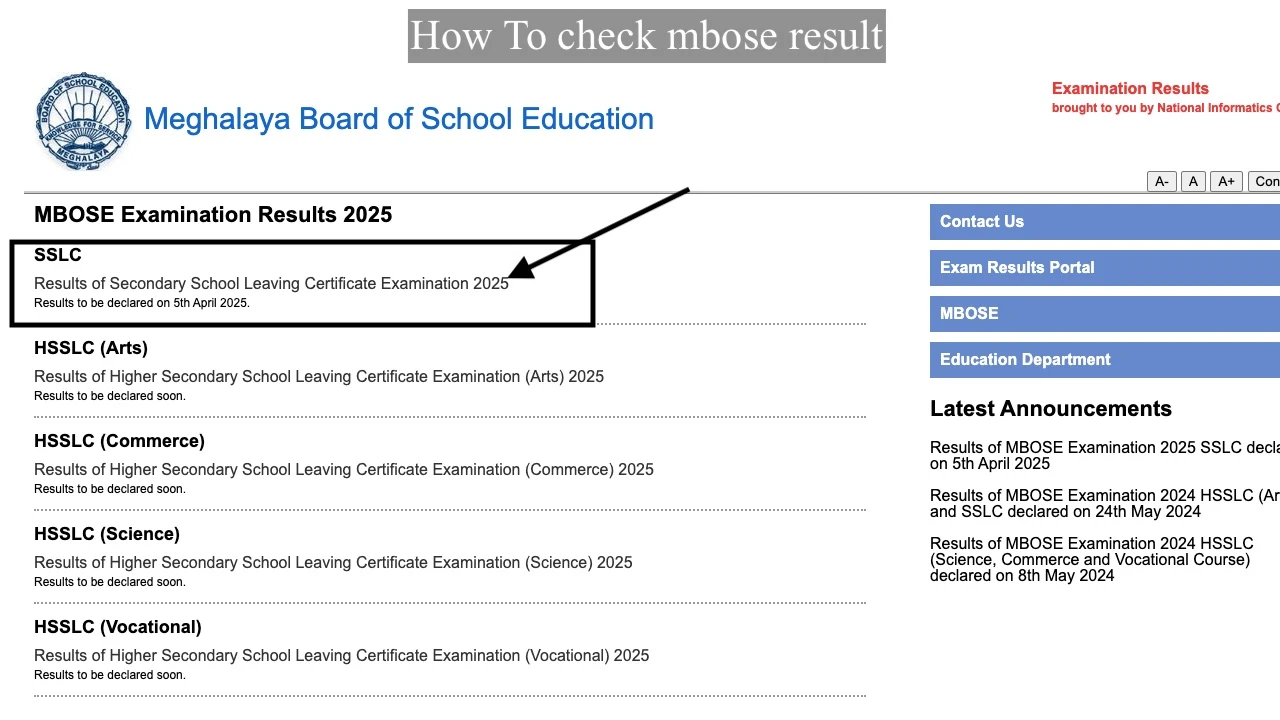
MBOSE Result for SSLC (Class 10) and HSSLC (Class 12) is published at mbose.in and megresults.nic.in by the Meghalaya Board of School Education. Students enter their Roll Number on the official portal to download the Meghalaya Board result as a 2-in-1 certificate containing both the marksheet and the pass certificate in one document. The SSLC result was declared on April 7 at 11:00 AM and the HSSLC result was declared on May 4 at 11:00 AM, covering results for Arts, Science, Commerce, and Vocational streams.
MBOSE Result: Key Details at a Glance
All the most searched facts about Meghalaya Board SSLC and HSSLC results are in the table below.
| Detail | SSLC (Class 10) | HSSLC (Class 12) |
|---|---|---|
| Conducting Body | Meghalaya Board of School Education (MBOSE) | |
| Board Headquarters | Tura, Meghalaya | |
| Regional Office | Shillong, Meghalaya | |
| Exam Dates | January 30 to February 11 | February 18 to March 13 |
| Exam Timing | 10:00 AM to 1:00 PM | |
| Result Declaration | April 7 at 11:00 AM | May 4 at 11:00 AM |
| Login Credential | Roll Number + Captcha Code | |
| Minimum Passing Marks | 33% in theory AND 33% in practical separately | |
| Certificate Type | 2-in-1 certificate (marksheet + pass certificate combined) | |
| Primary Portal | mbose.in | |
| NIC Portal | megresults.nic.in | |
| Alternate Portal | mboseresults.in | results.shiksha | |
| Original Marksheet Available | Via school (collect from school) | 2 weeks after result via school |
| Supplementary Exam | Available (Compartment / Improvement) | Cancelled from 2026 onwards |
MBOSE Result Pass Percentage: SSLC and HSSLC Streams
MBOSE declared the highest pass percentages in recent years for both SSLC and HSSLC, with Arts recording the top performance among all HSSLC streams.
| Exam and Stream | Pass Percentage | Key Statistic |
|---|---|---|
| MBOSE SSLC (Class 10) Overall | 86.84% | 42,228 students passed |
| MBOSE HSSLC Arts Stream | 88.63% | Highest among all streams |
| MBOSE HSSLC Commerce Stream | 87.49% | Second highest pass rate |
| MBOSE HSSLC Science Stream | 83.70% | Third highest pass rate |
| MBOSE HSSLC Regular Students | 87.13% | From total 3,766 appeared |
| MBOSE HSSLC Overall (Regular + Non-Regular) | 85.24% | 3,210 students passed |
MBOSE releases stream-wise pass percentage, subject toppers, and a Top-20 merit list as part of the Abstract of Results booklet along with the HSSLC result. The SSLC topper list is also published on the official website at mbose.in on the day of result declaration.
How to Download MBOSE Result at mbose.in
To download the MBOSE Result, visit mbose.in, click the SSLC or HSSLC result link, enter your Roll Number and Captcha Code, click Submit, and save the PDF marksheet.
- Go to the official Meghalaya Board website at mbose.in or the NIC result portal at megresults.nic.in.
- On the homepage, click the result link labelled for your exam. Options include:
- SSLC Result for Class 10 students
- HSSLC Arts Result for Class 12 Arts stream students
- HSSLC Science, Commerce and Vocational Result for remaining Class 12 streams
- Enter your Roll Number exactly as printed on your MBOSE admit card.
- Enter the Captcha Code shown on screen.
- Click the “Submit” or “Get MBOSE Results” button.
- Your Meghalaya Board result with subject-wise marks appears on screen.
- Download the 2-in-1 certificate PDF and save it immediately.
- Take a printout and store it safely for Class 11 admissions, CUET UG registration, or higher education applications.
Keep your MBOSE hall ticket ready before visiting any result portal. If mbose.in is slow due to high traffic right after result declaration, try mboseresults.in or results.shiksha as faster alternatives. No physical display of results is available at the MBOSE office in Tura or Shillong.
How to Get MBOSE Result via SMS Without Internet
Students can receive the Meghalaya Board result as an SMS message on any mobile number by using these specific codes.
- For SSLC (Class 10) result: Type MBOSE10 <space> Roll Number and send to 56263.
- For HSSLC (Class 12) result (format 1): Type MG12Roll Number (no space) and send to 58888.
- For HSSLC (Class 12) result (format 2): Type MBOSE12Roll Number and send to 56263.
Replace “Roll Number” with your actual 6 or 7 digit MBOSE roll number before sending. Standard SMS charges apply based on your mobile network operator. The result will be sent back to your phone within a few minutes.
How to Download MBOSE Result via the Official Mobile App
The MBOSE Official Android App, available on Google Play Store, lets students download and share the Meghalaya Board result directly from a mobile phone.
- Search for “MBOSE Results” on Google Play Store or use the direct link from the official website at mbose.in.
- Download and install the MBOSE Official App on your Android device.
- Open the app and choose between SSLC or HSSLC result.
- Enter your Roll Number in the search field.
- Tap “Get MBOSE Results” to view your marksheet.
- Share the result directly on WhatsApp or email from within the app.
What Login Credentials Are Required for MBOSE Result?
MBOSE requires only 2 credentials to access the result: a Roll Number and a Captcha Code.
- Roll Number: The unique number assigned to each student at the time of examination registration. It appears on the MBOSE admit card and the examination registration form.
- Captcha Code: A visual verification code displayed on the result login page. It changes with every new page load and must be entered exactly as shown.
Students who cannot find their roll number should contact their school immediately. Schools maintain complete roll number records for all students who appeared for the MBOSE SSLC or HSSLC examinations. Students must hold on to the admit card until the original marksheet and pass certificate is received from the board through their school.
What Does the MBOSE Marksheet and 2-in-1 Certificate Show?
The MBOSE result PDF is a 2-in-1 certificate that combines the marksheet and the pass certificate into a single official document issued by the Meghalaya Board.
- Student full name as registered with MBOSE
- Roll Number and date of birth
- School name and school code
- Stream name such as Arts, Science, Commerce, or Vocational
- Subject-wise marks obtained in theory and practical separately
- Total marks obtained and maximum marks
- Grade awarded in each subject
- Division (where applicable)
- Overall qualifying status: Pass or Fail
- Board name and year of examination
Report any error on the MBOSE online result to your school authorities immediately after downloading. Students must not wait for the original marksheet to identify discrepancies. The board accepts correction requests only within a specified time after result publication. Contact the MBOSE SSLC branch at sslc@mbose.in or the HSSLC branch at hsslc@mbose.in for educational verification queries.
How to Collect the Original MBOSE Marksheet After the Result
MBOSE distributes original marksheets and pass certificates to schools, not directly to students, and students collect these from their own school.
- Schools affiliated to the Meghalaya Board collect original marksheets from the designated MBOSE office in Tura or Shillong.
- Students must visit their school to collect the original documents after the school receives them from MBOSE.
- HSSLC students receive the original marksheet approximately 2 weeks after the result announcement.
- The downloaded provisional 2-in-1 PDF is accepted by colleges and universities temporarily during the admission process.
No student needs to visit the MBOSE Tura or Shillong office in person to collect their marksheet. All physical distribution happens through the school or college that issued the hall ticket.
MBOSE HSSLC Supplementary Exam: Has It Been Cancelled?
Yes, the MBOSE HSSLC supplementary examination has been cancelled from 2026 onwards. Students who fail in any subject in the Class 12 HSSLC examination can no longer appear for a separate supplementary exam in the same year. This is a major policy change by the Meghalaya Board of School Education that directly affects students who fail one or more subjects in the annual HSSLC exam.
Students who do not pass all HSSLC subjects must re-enroll and repeat the relevant subjects in the next academic session. Visit mbose.in for the latest notifications regarding this policy and any future updates to HSSLC examination regulations.
MBOSE SSLC Compartment and Improvement Exam
SSLC (Class 10) students who fail in one or more subjects can appear for the MBOSE SSLC Compartment or Improvement examination, which MBOSE conducts annually.
- Students who fail in the SSLC annual exam are eligible to apply for the Compartment exam held in June every year.
- SSLC students who pass all subjects can also appear in the Improvement exam to score higher marks in specific subjects.
- The application form for the Compartment or Improvement exam is submitted through the student’s school to the MBOSE office.
- Compartment result is published on mbose.in after the exam concludes.
SSLC Compartment exam applications are submitted through the school within the deadline announced on mbose.in. Students should check the official MBOSE website immediately after the SSLC result for the Compartment exam schedule, fee details, and application procedure.
How to Apply for MBOSE Re-evaluation and Rechecking
Students who are not satisfied with their MBOSE marks can apply for re-checking and re-evaluation through their school after the result is declared.
- Re-checking: Officials verify that all questions were evaluated and all marks were correctly totalled. No re-reading of content takes place during rechecking.
- Re-evaluation: A second examiner re-reads and re-marks the answer script. Marks may increase, decrease, or remain unchanged after re-evaluation.
Applications for both processes open shortly after result declaration and are submitted by the student to the school, which forwards them to MBOSE. Students apply for re-evaluation through their respective schools, not directly at the MBOSE office. Check mbose.in for the fee, deadline, and specific procedure for each academic year after the result is published.
What to Do After Checking Your MBOSE Result
After Passing MBOSE SSLC (Class 10)
- Download and save the 2-in-1 provisional certificate PDF from mbose.in or megresults.nic.in immediately.
- Collect the original marksheet from your school once MBOSE distributes physical certificates through affiliated schools.
- Choose a stream for Class 11 at a Meghalaya Board school based on your marks and career goal. Available streams include Science, Commerce, and Arts.
- Submit the Class 11 registration online through the MBOSE Class XI Registration Portal. The portal link is available on mbose.in.
After Passing MBOSE HSSLC (Class 12)
- Download the provisional 2-in-1 HSSLC certificate from mbose.in right after the result is declared.
- Collect the original marksheet and certificate from your school approximately 2 weeks after result declaration.
- Register for CUET UG, NEET, or JEE if you are applying to central universities or engineering and medical colleges.
- Apply for degree college admissions using the provisional marksheet, which most institutions accept temporarily pending the original certificate.
After Failing MBOSE SSLC
- Apply for the SSLC Compartment or Improvement exam through your school as soon as the application window opens on mbose.in.
- Apply for re-evaluation or rechecking within the deadline if any subject marks appear incorrect.
- Use the MBOSE old question papers available in the Downloads section of mbose.in to prepare for the Compartment exam.
About the Meghalaya Board of School Education
The Meghalaya Board of School Education (MBOSE) was established in 1973 under the Meghalaya Board of School Education Act, 1973. The board held its first SSLC examination in 1974. MBOSE manages, controls, and supervises all matters related to school education in Meghalaya, including framing the syllabus, conducting examinations, and issuing certificates for both the SSLC and HSSLC. Its headquarters are located in Tura, Meghalaya, with a regional office in the state capital of Shillong.
Before 1996, the Class 12 Higher Secondary course was managed by the North Eastern Hills University (NEHU) at Shillong under the name “Pre-University Course.” After NEHU discontinued the Pre-University Course in 1996, MBOSE took over full responsibility for the Class 12 HSSLC examination and its syllabus. MBOSE now conducts examinations for both Class 10 SSLC and Class 12 HSSLC across all 4 streams: Arts, Science, Commerce, and Vocational.
Frequently Asked Questions About MBOSE Result
Go to mbose.in or megresults.nic.in, click the SSLC or HSSLC result link, enter your Roll Number and Captcha Code, and click Submit. The 2-in-1 certificate PDF appears on screen and can be downloaded immediately. Alternative portals include mboseresults.in and results.shiksha if the primary site is slow.
Students must score at least 33% marks in theory and 33% in practical separately to pass any subject in the MBOSE SSLC or HSSLC examination. Failing either component individually results in a fail grade for that subject, even if the combined average meets the threshold.
For SSLC result, type MBOSE10 followed by a space and your roll number and send to 56263. For HSSLC result, type MG12 followed by your roll number and send to 58888, or type MBOSE12 followed by your roll number and send to 56263.
Yes, the MBOSE HSSLC supplementary examination has been cancelled from 2026 onwards. Class 12 students who fail any subject in the annual HSSLC exam cannot appear for a supplementary exam in the same year and must re-enroll for that subject in the next academic session.
The original MBOSE marksheet is available from the student’s school approximately 2 weeks after the result announcement. MBOSE sends marksheets to affiliated school principals, not directly to students. The downloaded provisional 2-in-1 PDF is accepted by colleges for admissions while the original is being processed.